Lesson 8: Reserves, Profit & APV
Calculate Reserves
As discussed in lesson 16, reserves are calculated using valuation assumptions, which are more prudent than the best estimate assumptions. Normally, the prudent valuation assumptions are derived by multiplying a padding % to the best estimate (“BE”) assumptions: (separate padding % for different assumptions)
q(Val)(annual) = q(BE)(annual) × (1 + Pad%)
- For decrement rates, such as mortality, TPD, CI and lapse rates, the % should be applied on the annual rates before they are converted into monthly rates.
- It is important to check if the total decrement rates for death, TPD & CI does not exceed 1 for all ages. If such condition appears, it is suggested to reduce padded mortality rates so that the total rates are equal to at most 1.
Per Policy Expense(Val) = Per Policy Expense(BE) × (1 + Pad%)
- For expenses (GAE & ARE), the padding % can be applied directly on the per policy expense calculated using BE assumptions. It is unnecessary to apply the padding % to every component of expense assumptions, as it does not require complex monthly conversion as decrement rates.
- Normally BE reserves and valuation reserves are calculated using the same discount rates. Under the current Risk-based Capital (“RBC”) framework, the discount rates used to calculate reserves vary by the cash flow duration, i.e. the no. of months between valuation date and the timing when a cash flow item occurs. For the purpose of this course, we do not use the such discount rates as it requires VBA macros in calculating projected reserves.
Calculate GPV
In our spreadsheet model, we need to setup two sets of cash flows, i.e. valuation cash flow and projection cash flow. Valuation cash flow is only used to calculate reserves; whereas projection cash flow uses reserves calculated from valuation cash flow and derive expected profits.
- For the purpose of this course, we are going to setup two separate worksheets in the spreadsheet models. If you would like to minimize no. of worksheets and use the same formulas for both valuation and projection scenarios, you would need to use VBA to automate the calculations (similar to the calculation looping concept in Prophet).
- For valuation cash flow worksheet, we only need to setup variables that are required in calculating reserves. For variables such as increase in reserves and profits, they should only be setup in the projection cash flow worksheet.
Apart from reserving, GPV is also calculated for different actuarial studies, e.g. asset share study for participating products (to check if the current bonus scales are still supportable). To calculate GPV under a projection scenario:
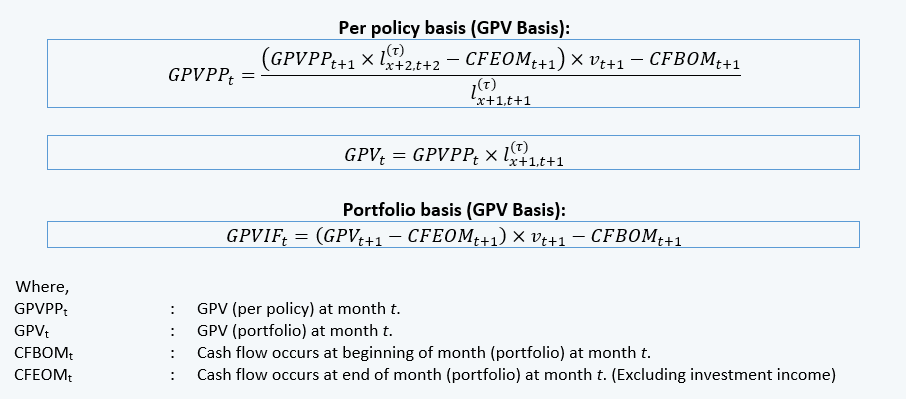
For reserving purposes, we use the same formulas as above but using cash flows projected using valuation assumptions. In our spreadsheet model, it is recommended to use the first method, i.e. recursive method, to calculate per policy reserves – Why shall we only transfer per policy reserve to the projection cash flow?
- MOP components for projection scenario are different from valuation scenario. To calculate projected reserve balance, we should refer to the no. of in force policies under projection scenario.
Reserve Balance(Proj) = Per Policy Reserve(Val) × No. of Polices(Proj)
- For example, the per policy reserve as at time t is 1,200. As at time t + 1, the no. of in force policies are projected as 0.90 and 0.95 under valuation & projection scenarios respectively. As the projection cash flow represents the “actual” cash flow, the reserves balance as at t + 1 should consider 0.95 policies instead of 0.90 policies.
Calculate Increase in Reserves
Increase in reserves (portfolio basis) under projection scenario is calculated as:
