Lesson 3: Calculation A – Movement of Policies
Create MOP Models
STEP 1: Create MOP Worksheet & Setup Common Columns
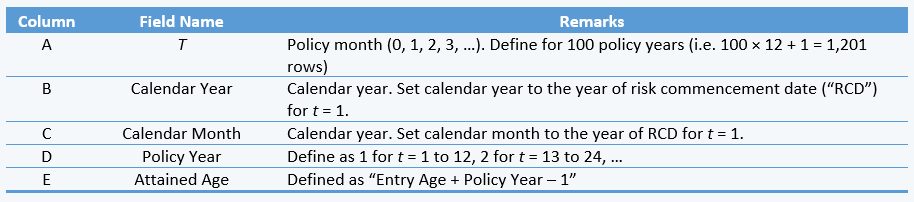
Create a new worksheet and name it as “calc_Portfolio”. Setup the following columns in the worksheet:
STEP 2: Setup Columns for Decrements
Create a new worksheet and name it as “refer_qx_dth”. Create a table with the following structure and transfer the mortality rates provided under ultimate rates. Create a new table with similar structure for converting the annual rates to monthly rates.

Setup formulas in “calc_Portfolio” worksheet to read required monthly mortality & morbidity rates from “refer_qx_*” worksheets. Repeat the above sub-steps for TPD and CI.
- Use the following formula to convert the annual rates into monthly rates before using the rates to calculate MOP components:

- If selection effects are considered in the cash flow models, the selection of death / TPD / CI rates also depends on policy years. Subscripts used for decrement rates with considerations of selection effects are “[x]” (select year 1), “[x] + 1” (select year 2) and “x + 2” (ultimate).
- Mortality rate at age 100 is set to 1. For TPD & CI, morbidity rates at age 100 are set to 0 (as TPD & CI are accelerated benefits).
- Use q[x] for policy year 1, q[x]+1 for policy year 1 and qx+2 for policy year 3 and above. Normally, the select year mortality rates are defined as a % of ultimate mortality rates.
- Update your worksheets by allowing different % to be applied on the select year 1 & 2 rates for death, TPD & CI.
- TPD / CI rates shall be set to 0 if:
- The modeled product does not cover TPD / CI.
- Accelerated TPD & CI benefits may cease earlier than death. Hence, morbidity rates after the age should be set to 0.
STEP 3: Setup Columns for MOP Components
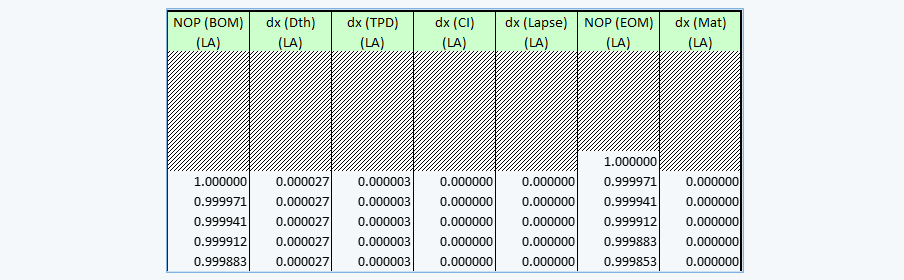
- For the purpose of cash flow modeling, you may need to setup two different fields for no. of policies, i.e. (1) no. of in force policies (EOM); and (2) no. of in force policies (BOM), after deducting maturity.
No. of in force policiesBOM(t) = No. of in force policiesEOM(t-1) – No. of Maturity(t)
- For new business projection (i.e. DUR_M = 0), no. of in force policies (BOM) at t = 1 should be set to 1, instead of setting equal to the closing value of previous policy month.
- For in force projection, MOP components as at valuation date are defined as follows:
- No. of in force policies (EOM): Set to 1
- Other MOP components: Blank.
- Controls Applicable to MOP Calculations
Apart from the formulas listed above, you can apply additional controls as follows in your MOP calculations:
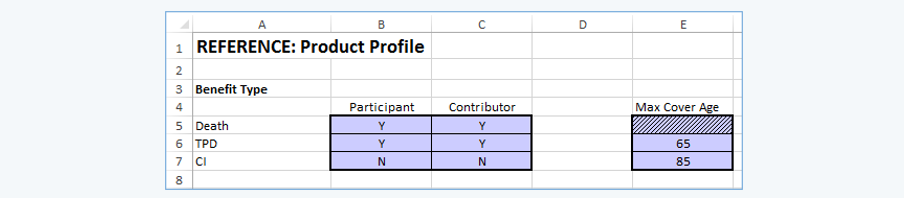
- Benefit selection indicators – Create a “refer_ProdProfile” worksheet to cater for controls at product level.
- Accelerated benefits expiring before death – Define the maximum coverage age for TPD (normally TPD coverage expires at age 64 or 65) & CI benefits.
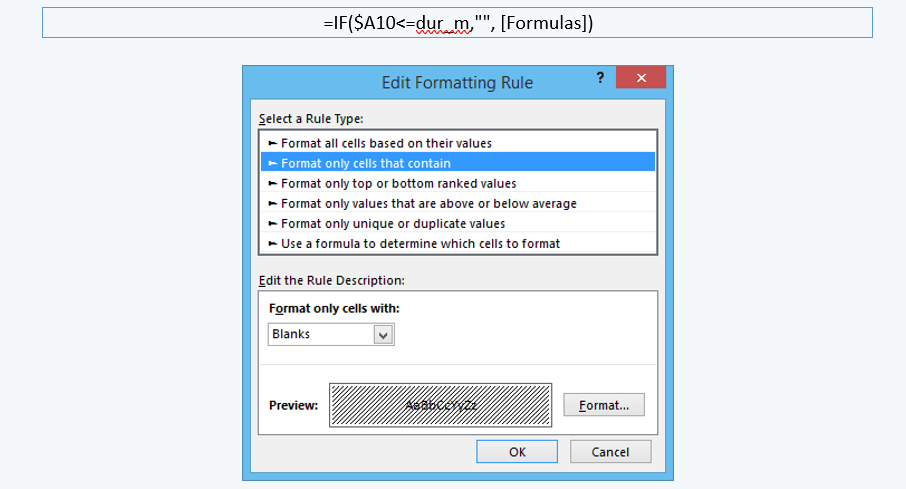
- Set blank to months before valuation date – For in force business projection, you can set the calculated cells (in calculation worksheets) prior to valuation date (i.e. < DUR_M or ≤ DUR_M, depending on the MOP & cash flow items) to blank by using the following formula and conditional formatting.
- Apply data validation if the Model Point fields that only uses specific range of values, in order to avoid unnecessary errors (e.g. gender (“M” & “F”), occupation class (1 / 2 / 3 / 4), smoker status (S / NS) and premium frequency (0 (single premium) / 1 / 2 / 4 / 12)).
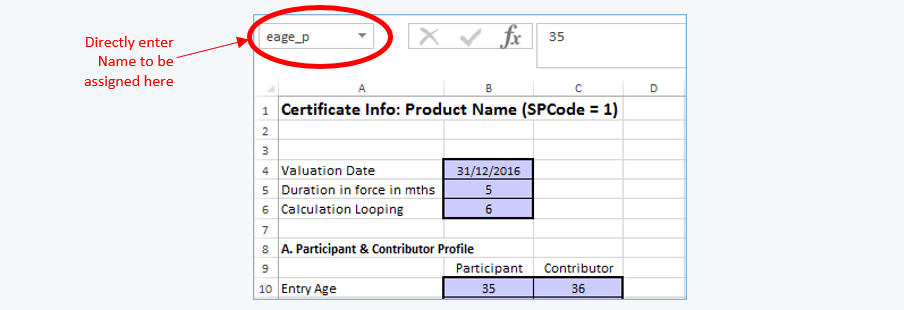
- As most Model Point information is referred repetitively in calculations, it is recommended to assign “names” to the respective fields (e.g. “eage_l” for life assured’s entry age).